инструкция
What is the purpose of this long read
The tools on our platform enable you to create a structurally cohesive long-form article, but if you want to visually diversify the presentation of your project—that is possible using special HTML codes gathered in this long-form article (these codes apply to all text blocks).
ATTENTION! Do not overload your long-form article with too many different visual techniques! These codes are necessary for adding emphasis and strengthening hierarchy. Be sure to consult with your instructor regarding the visual appearance of your long-form article.
инструкция
How to Change Color in Code
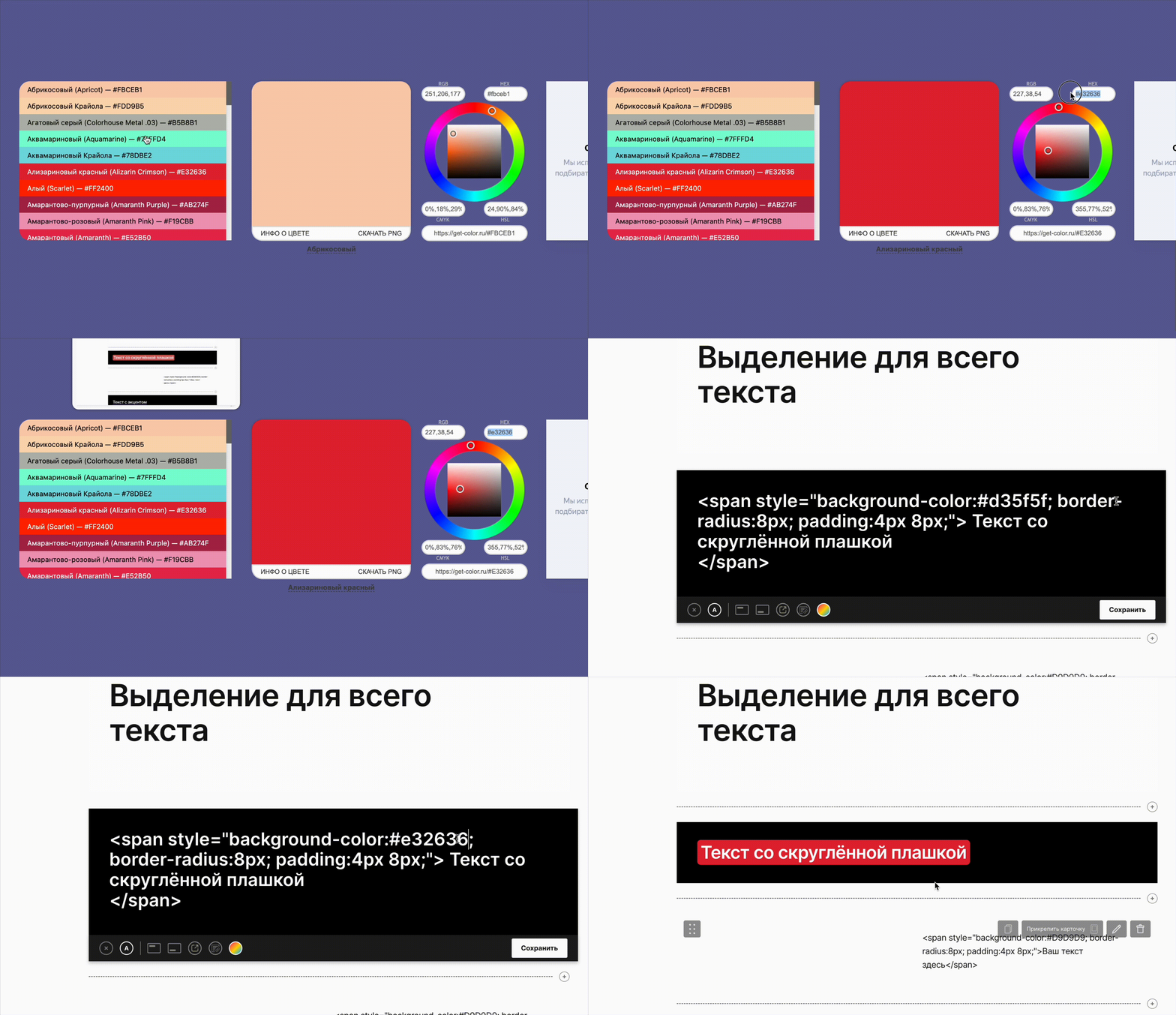
- Determine the color code* you are using for your project. This can be done using any program with color manipulation capabilities (Photoshop, Illustrator, Figma, etc.) or through dedicated websites: an example of such a service*A color code begins with the '#' symbol followed by a set of numbers and letters.2. Copy your color code and locate the section in the code that starts with a hash mark:<span style="background-color: #D9D9D9;border-radius:8px; padding:4px 8px;">Your text here</span>3. Replace the color code with yours. ! There must only be one '#' symbol in the code.
инструкция
How to Embed Code in Text
The code consists of an opening tag < and a closing tag >. When you place the text you need inside the code, the continuation of the text should follow the closing tag >.Example:
<span style="background-color:#FF77B7; font-weight:700; padding:3px 6px;">The text you need goes here</span>After the tag, write the rest of the text.
Highlighting the Main Points in the Text
Text with rounded badge
Your text here
Highlighted Text
Your text here
A brief clarification
Your text here
Key Definition
Your text here
Text in Box
Your text here
Change text or phrase color
Your text here
Working with Typeface and Hierarchy
Basic Title
Your text here
Controlling Text Weight
As We Wish
To adjust the thickness, enter the desired number after the word «weght»<h1 style="font-weight:900;">Your text here</h1>
Text Size Adjustment
To adjust the size, enter the desired number after the word «size»